Starknet Swaps: How to Buy & Sell Tokens on Starknet
Discover how to swap tokens on Starknet with Xverse, including how to fund your wallet, bridge assets and trade seamlessly across the expanding BTCFi ecosystem.
Sign up for updates!
Stay tuned to our latest news and updates
.svg)
Starknet is rapidly establishing itself as a premier destination for BitcoinFi, offering new opportunities for token trading and yield generation within a scalable Layer 2 environment.
Xverse allows you to easily swap Starknet tokens to quickly enter and exit the BTCFi ecosystem on Starknet, so you can explore all the opportunities it offers. This guide will take you through the entire process.
What Are Starknet Swaps?
Starknet swaps are token exchanges on the Starknet L2, such as swapping STRK for wBTC, for example.
There’s a steadily growing number of tokens on this L2, which means switching between them is becoming increasingly important for those who want first dibs on exploring tokens in this ecosystem.
Starknet started out as an Ethereum L2 that has since expanded to become an execution layer for Bitcoin, opening up new Bitcoin DeFi possibilities. The ecosystem is becoming larger by the day, adding new capabilities and offering new avenues for Bitcoin users.
Xverse’s Starknet integration is the perfect way to keep up with everything.
How to Buy & Sell Starknet Tokens (Using Xverse), Step-by-Step
Buying and selling Starknet tokens is simple and easy using your Xverse wallet. Here’s how it works:
Download & Set Up the Wallet
If you haven’t done so already, download the Xverse wallet as either a browser extension or a mobile app. Choose a secure password, then copy down your seed phrase and keep it in a secure physical location, since this is the only way to retrieve your wallet if you need to reinstall it.
Fund Your Wallet: BTC, wBTC on Starknet, STRK
To start off, you’ll need some BTC in your wallet. Transfer it from another wallet, exchange, or buy it using the fiat on-ramp included in your Xverse wallet.
If you’re buying with fiat, you can pay with a credit card, debit card, PayPal, Apple Pay, Google Pay, Revolut, Venmo, or more than 170 other payment methods.
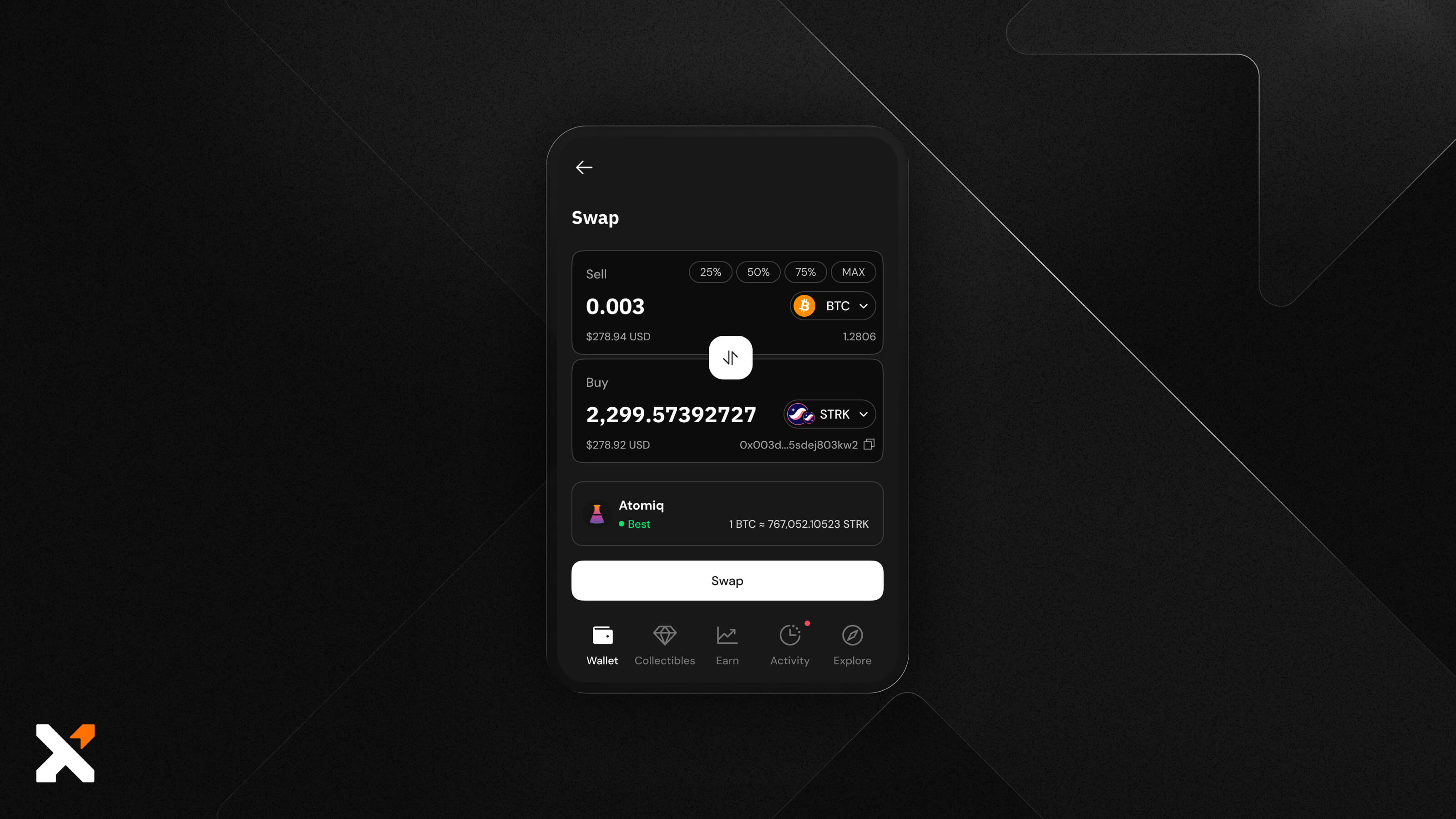
Then, you have two main ways to enter the Starknet ecosystem. First, you can buy STRK tokens with BTC using the Swap feature.
You’ll want to choose BTC as the currency you’re selling and STRK as the one you’re buying. When selecting STRK, make sure you’ve chosen the purple Starknet icon to see the supported tokens. Additionally, check that you have enough BTC left over to cover transaction fees before initiating the swap.
Another possible option is to bridge BTC to the Starknet L2 and turn it into wBTC.
In your Xverse wallet, find the Starknet wBTC (you’ll recognize it by the Starknet icon in the lower left corner), click on it, then click on the Convert option. You’ll be able to choose between bridging BTC to wBTC on Starknet and vice versa.
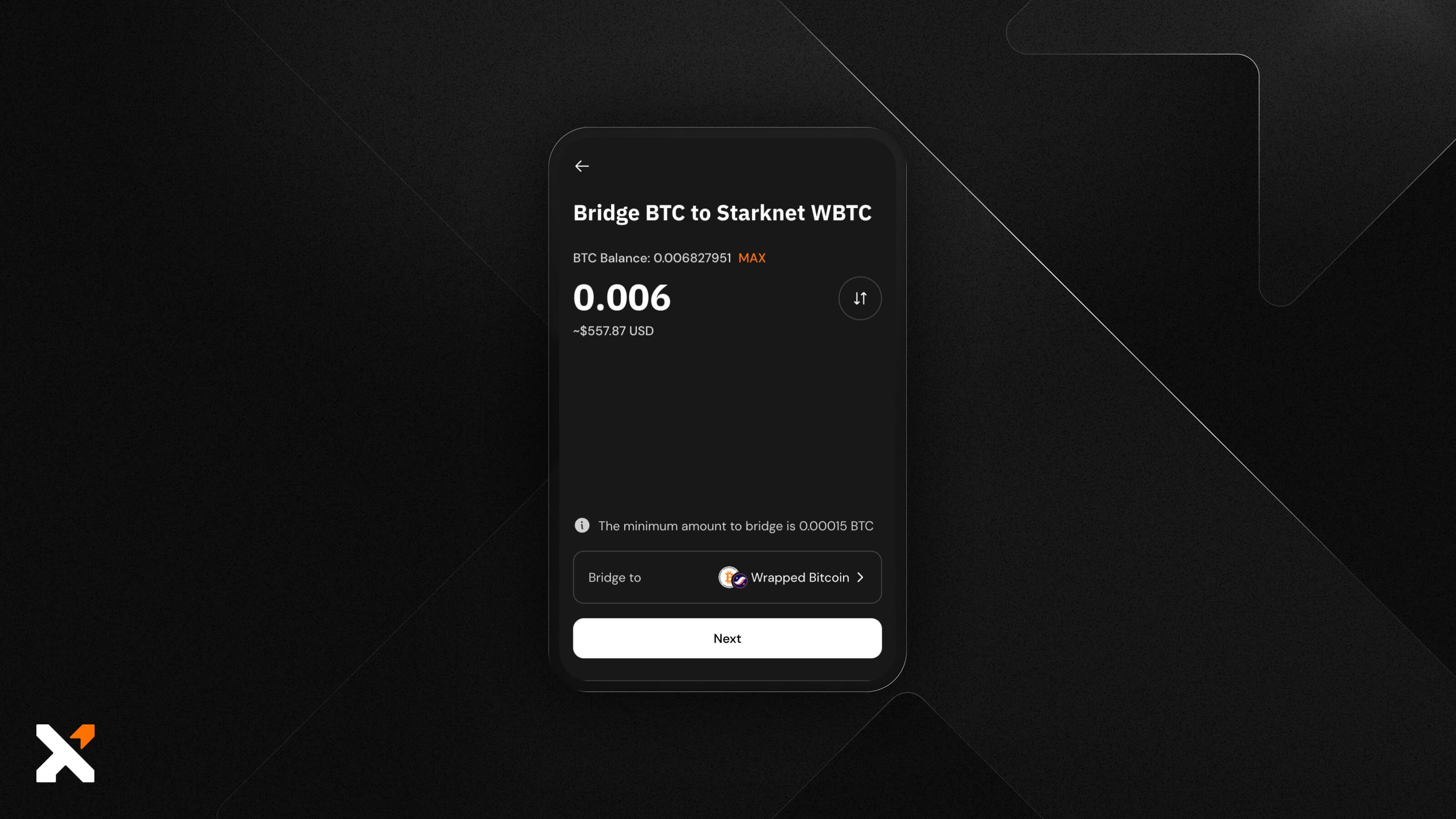
Enter the amount you want to bridge, then review all the details of the quote, and if you’re happy with them, complete the transaction. Your swap will be completed once the transaction gets two confirmations on the Bitcoin network.
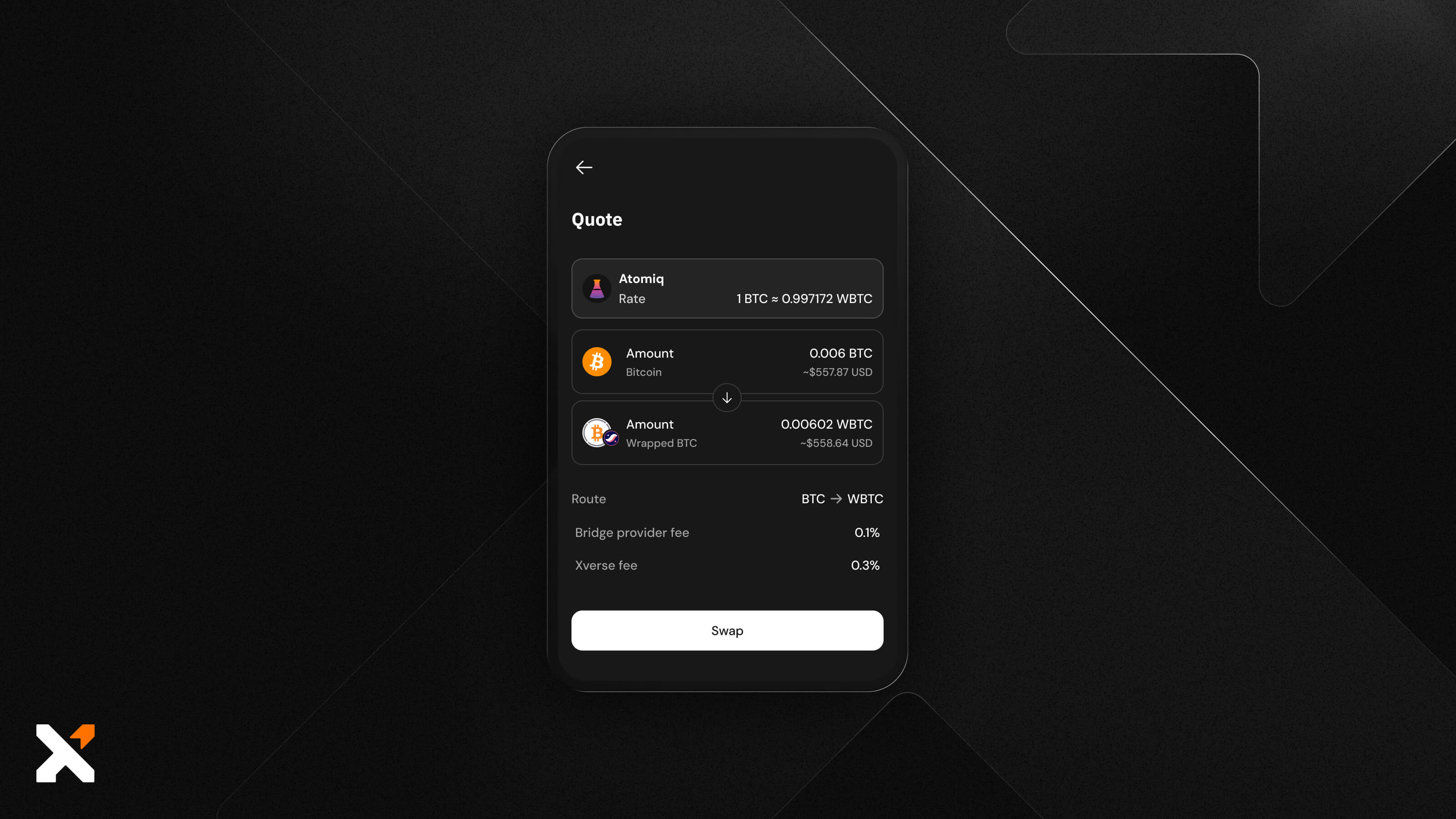
Swap on the Starknet Protocol
Now that you have your Starknet-based tokens, be they STRK or wBTC, you can swap them for any number of other tokens on this L2.
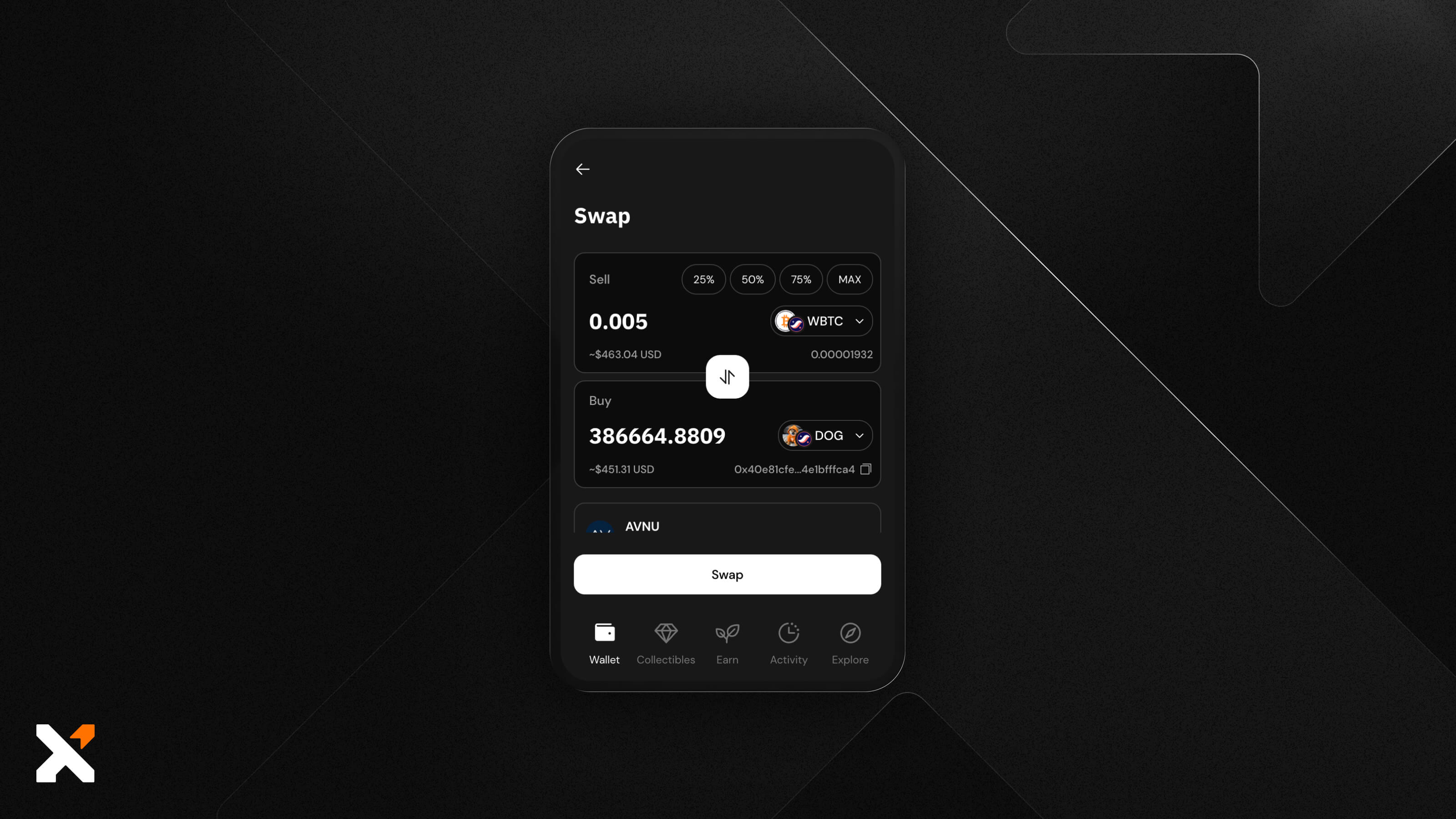
When you open the Swap feature, choose your transferred Starknet token in the Sell field, then find the token you want to receive from a list of supported tokens in the Buy field.
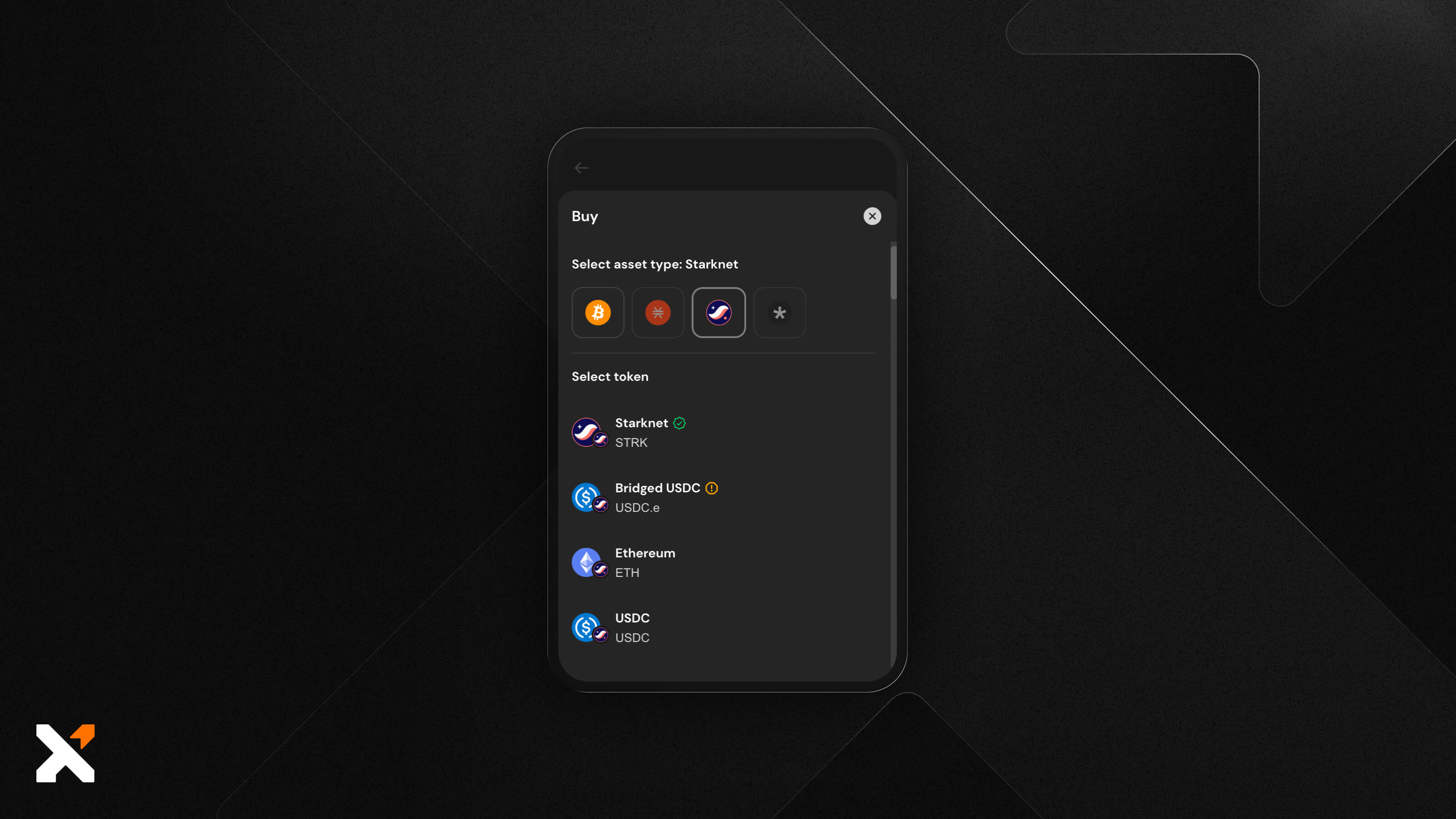
When you find the token you want, enter the amount you’re selling (or the amount you’re buying, and then the other field will autofill), check the quote you get, and if you’re happy with everything, click on Swap.
The process is nearly instantaneous, so it only takes a click and a few seconds for your new balance to update.
And you’re all done!
Seamlessly Swap, Store, & Manage Starknet Tokens With Xverse
Xverse is the market-leading Bitcoin Web3 wallet for good reason: it supports a growing number of Bitcoin L2s, and Starknet is no exception. It’s the right choice for anyone who wants the advantage of an intuitive user experience, high security, cross-chain swaps, and access to the larger Bitcoin ecosystem from a single interface.
Download the Xverse wallet today to start exploring BTCFi on Starknet.
FAQs
Can I swap any token on Starknet with Xverse?
Yes, Xverse supports Starknet token swaps. You’ll find a list of supported tokens in the Buy section when you filter Starknet tokens. Here, you can find tokens like DOG (Starknet version, of course), EKUBO, SolvBTC, LORDS, BROTHER, SURVIVER, SCHIZODIO, plus a range of coins from other ecosystems that can be bridged to Starknet, including BTC, ETH, and SOL.
How long does a Starknet swap take?
Swaps between two tokens on Starknet are nearly instantaneous. When you confirm a swapping transaction, it only takes a few seconds for your wallet balance to update. However, bridging to and from Starknet takes two confirmations on the Bitcoin blockchain, so if you need to bring some funds onto Starknet first, keep this in mind.
Are Starknet swaps safe?
Yes, Starknet swaps are safe. Your Xverse wallet is self-custodial, which means you retain control over your funds at all times. For the swaps, Xverse uses decentralized liquidity for added security. Since Starknet is integrated with Xverse, you get industry-leading security without sacrificing convenience.


.svg)

Related articles
Borrow USDC Against Bitcoin Without Selling: Zest Collateral Vault + Xverse
Bitcoin holders face a paradox. The asset they refuse to sell is the same one they need liquidity from. The Zest collateral vault offers a self-custodial path: lock native BTC, borrow USDC on Ethereum, keep the long position.